Tuesday, August 6, 2013

Who2 - A search engine for "biographies of famous people, characters and creatures."

Who2 is an awesome little search engine that allows you to search for "biographies of famous people, characters and creatures."   I mentioned Who2 in a previous post about Biography Search Resources but wanted to give Who2 more attention.  It is a great, FREE, resource to help students quickly find information about a person they may be researching.
Who2 has information laid out where its easy to find

Who2 doesn't go into great detail about a person's entire life, but discusses the bigger moments that made them who they are today.  This would be a great website to use in tandem with other sites (such as Biography.com and/or an online Encyclopedia) while researching a specific person. You will find some ads, but they are not overly intrusive to your research.

Be sure to introduce Who2 to your students as an easy way to find quick information while they are researching biographies.


You can access Who2 at:
http://www.who2.com/

Saturday, December 1, 2012

Internet Safety & Awareness Brochure Creation WebQuest

With our students spending more time online, learning to be positive digital citizens and staying safe online is becoming more and more important.  Unfortunately, many children do not seek the information needed to educate and empower themselves to stay safe while surfing the web or social networking. 

I created a WebQuest for my students to learn about 3 specific topics pertaining to Internet Safety.  These topics are Cyberbullying, Online Identity Theft and Sexting.  The WebQuest asks students to research information about each topic, including tips to prevent them from happening and what to do if they DO occur.

This WebQuest is very similar to the Internet Safety Comic Book WebQuest I previously posted.  However, this WebQuest has students create an informational Brochure they can share with their classmates and/or community.  The WebQuest is aligned to the NETs for Students Technology Standards, includes completed student examples, and even includes valid safe website links students can use to research for their Brochures.  You can click on the link below to visit the WebQuest.

Internet Safety & Awareness Brochure Creation WebQuest:
http://zunal.com/webquest.php?w=124038

Saturday, November 3, 2012

Internet Safety & Awareness Comic Book Creation in ToonDoo WebQuest

One of the more popular posts I have created on my blog was using the online resource ToonDoo to create Internet Safety & Awareness Comic Books.  I have decided to adapt this lesson plan to a WebQuest format for all of you to share with your students and fellow teachers.  I used the site Zunal which allows you to create WebQuests easily and for FREE (although you only get to create one webquest with a FREE account).  I have posted the link to the WebQuest below. 


During the WebQuest, your students will look up information about Cyberbullying, Online Identity Theft and Sexting.  I have added 5 online resources for each topic to guide your students' research.  I hand picked these topics myself so they were safe for my 6th Grade Students.  You may want to review them if you have students who are younger, but I think they should be fine.  I have also added one video for each topic to help visual learners gain a better understanding of each Internet Safety Topic. 

Students will research each topic, create a rough draft storyboard, and finally create the final comic book.  This is a very engaging and exciting way to practice the writing process by allowing students to peer evaluate each StoryBoard and make revisions before creating the final comic.

I have also included an example of Comic Books for each Internet Safety Comic that were created by my own students. 

I would love to hear impressions, see examples, or even suggestions to how I could make this WebQuest even better. I am open to anything you would like to share and would love to hear from you!


Here is a link to the WebQuest:
http://zunal.com/webquest.php?w=119024 


Here is a quick look at the examples for each topic:

Online Identity Theft:


Cyberbullying:


Sexting:


Tuesday, October 2, 2012

"Who's a Cyberbully" Anti-Cyberbullying & Cyberbully Prevention Rap Song


"Who's A Cyberbully" is an original rap song written I wrote and recorded for my school. The video for this song was filmed and created by GMS Students Alex Rawlins and Nick Sloan as a project for Mrs. Vest's 8th Grade Applied Skills Class. The humor of 8th Grade students shows in the video, but the message is very serious. The song details & describes the frustrations and pain caused by cyberbullying (bullying using the internet, cell phones, video games, or other electronic devices), how to prevent it from happening, and what to do if it happens to you. I wrote and recorded this song (my 7 year old daughter sang the chorus) in honor and memory of Phoebe Prince and Megan Meier. Both girls took their own lives after being constantly cyberbullied and bullied by classmates. Please, if you are a vicitim of bullying and/or cyberbullying or know someone who is, contact a trusted adult or teacher. Nobody deserves to be a victim of bullying and/or cyberbullying. Copyright 2011. The music/beat was produced by Nebula.

This song can be used as a tool in classrooms to introduce the topic of cyberbullying, prevention, and what to do if it happens to you! If you would like to contact the creator of this song, please email Mr. Dean at mrddean@gmail.com.

Wednesday, September 26, 2012

"The Bully System" Anti Bullying Anti Bully Rap Song


This is a song that I wrote and recorded during the 2010-2011 school year as a tool to help students learn about and prevent Bullying.  The song is written to explain what bullying is, how it makes someone feel, what to do if you are being bullied, and how to prevent it from happening. 

The video was filmed and created by students Chris Henderson and Cameron Carter as an 8th Grade Computer Class Project for Mrs. Vest's 8th Grade Applied Skills Class

Please feel free to use this song as a resource or tool to introduce bullying and bully prevention in your classroom.  To contact me, please email me at mrddean@gmail.com.  

The beat is produced by Nebula.

Saturday, August 4, 2012

Forvo - Any Word, Pronounced

Forvo is a site that bills itself as "Any word in the world, Pronounced!"  When I first started navigating the site, I instantly realized what a fantastic tool it would be for your English Language ELL and English as a Second Language ESL Learners.  The site is simple, you enter any word in the search box and can hear it pronounced by simply clicking the play button. You are not limited to a single pronunciation cause there can be dozens for a specific word. 


What is even more interesting, users from around the world can record their pronunciations and upload them to Forvo.  This is awesome to hear a word such as "Castle" pronounced with different accents, from males and females.  Currently, you can hear people from the United States, Australia, United Kingdom, and Canada all pronounce the same word.  This gives you a chance to discuss different regions of the world and how their accents may sound when pronouncing English words.  It also serves as a great example of how their are multiple ways to pronounce a word correctly.  Just because YOUR pronunciation doesn't sound exactly like someone else's, doesn't make it incorrect.

You can check out Forvo at:
http://www.forvo.com/

Sunday, April 29, 2012

Arcademic Skill Builder - Competitive, trackable games to help build basic skills!

Arcademic Skill Builders offers a variety of games to help build and reinforce basic math, language arts, vocabulary and thinking skills.  The site allows teachers to upload a class of students and monitor their progress.  You can even group your students based on ability and assign different games and activities to different groups of your students.  Right now, the site is in beta and allows you to upload and monitor your class for free during the beta phase. 

Arcademic Skill Builders offers skill building games ranging from Grade1 through Grade 6 in topics covering:
  • Addition 
  • Subtraction
  • Division
  • Multiplication
  • Algebra
  • Fractions
  • Decimals
  • Integers
  •  Money
  • Time 
  • Geography
  • Typing
  • Language Arts
Games can even be played in competitive multi-player between students in your class.  Students can set up their own private games with other class members by sharing a password.  There is even an iPad app so students can play their games on the go.   Check out Academic Skill Builders today at:

http://www.arcademicskillbuilders.com


Thursday, March 15, 2012

You Are Here - Online Activities, Resources, & Games to teach kids to be smarter consumers!

You Are Here is a cool interactive site developed and hosted by the FTC (Federal Trade Commission) that offers many resources to help make kids smarter consumers.  You Are Here is broken up into 4 main sections of information:

The West Terrace - This is where students can learn about advertising techniques, suspicious claims, and more.

The Food Court - Students can learn about business competitions, monopolies, supply and demand, and more.

The Security Plaza - Students can learn about protecting their privacy and their online identity.

The East Terrace - Students can learn about online rip offs, bogus offers, and scams. 

There is even a Parents & Teachers Page with informational PDF Printouts and lots of lesson plans for each topic.


Check out You Are Here at:

http://www.ftc.gov/bcp/edu/microsites/youarehere/index.html

Thursday, February 16, 2012

"Its My Life" - Games, Activities, Advice, & Resources for Teens


Its My Life is a great resource provided by PBS that offers many resources, stategies, games, advice and forums for students to discuss issues relating to being a teenager.  Student can watch videos, share their experiences, take polls, play games and more across 6 different subjects related to today's teenagers.


It's My Life is broken up into resources and activities covering Friends, Family, School, Body, Emotions, and Money.  Just the games alone are a great resources for students who have a few extra time in class and you would like them to do something educational or worthwhile. 

 
It's My Life has contributions by a number of experts, doctors, teachers, conselors and more.  There is no subject off limits, but the subject matter is moderated to remain clean and safe for students and school.  


Check out It's My Life by PBS at:  
http://pbskids.org/itsmylife/index.html

Monday, January 9, 2012

We Give Books - Free Online Children Books & Helping Others All In One!

We Give Books is an awesome site that shares FREE Online Children Books.  This site was shared with me by one of our wonderful school counselors.


Every time you read a book, We Give Books a book to an organization or child that needs it.  The books are high quality online versions you can clip through page by page, complete with illustrations.

You can sign up for an account, or use your Facebook account to login, and keep track of the books you have read and the what has been donated on your behalf.  This is fun for your children and students to see how you progress and how much you give.

Check out We Give Books at:
http://www.wegivebooks.org/


Monday, January 2, 2012

Happy New Year 2012

Happy New Year 2012 to you all.  I have been on a holiday for the past several weeks and will be back sharing online Web 2.0 resources by the end of this week.  Thank you to all of you for your support and interest in my blog.  I really hope to get more feedback and comments on my blog posts in 2012 to truly make Class of Tech more interactive.  Thanks again and Happy New Year!

Friday, December 2, 2011

ToonDoo - Create custom comic books, online, with your own characters, images, and more!

ToonDoo is a site that allows students to create their own Comic Books, online, in their web browsers.  If you use technology in your class, you have probably heard of ToonDoo, but are you using it? 

Last school year, I blogged about using ComicMaster to create Internet Safety Comics.  You can read that post RIGHT HERE.  This year, we moved to ToonDoo to provide a more customizeable experience that really doesn't limit my students creativity. 

ToonDoo gives students a great resource to practice writing stories with a setting, characters, introduction, rising action, climax, resolution, and conclusion.  Students could start with a rough draft, or story board, then use their storyboard to create their final comic.

Mr. Dean "TraitR" in ToonDoo!
You can even use your own images to import into ToonDoo.  I took more than 30 images around my school of the cafeteria, gymnasium, hallways, classrooms, labs, etc.  Then, students could create their own "TraitR" or comic version of themselves to populate their images.  You can see the TraitR of myself in the image to the right.  

Since one of my passions is Internet Safety, I have my students creating Comic Books about 1 of 3 Internet Safety Topics; Online Identity Theft, Sexting, or Cyberbullying.  We start with a storyboard or rough draft.  When students have completed their storyboard, and I have checked it, they may begin working on their final comic.  A storyboard really helps give the students a direction so they do not waste time staring at ToonDoo and trying to come up with a story on the fly.  Each of my students' Comics must define the Internet Safety Topic, list 3 ways to prevent it, and list 3 ways to stop it if it has already happened. 

Here is an example of one of my student's finished comic books about Online Identity Theft:
http://www.toondoo.com/ViewBook.toon?bookid=331651

All of the characters were created by my 6th Grader, and the backgrounds on each frame are an assortment of images from our school, standard backgrounds from ToonDoo, and images from a Google Image search (since some scenes take place at home).  Students start by creating each frame of the comic, one by one.  They can then add these frames into the BookMaker and piece their frames together into their own Comic Book. 
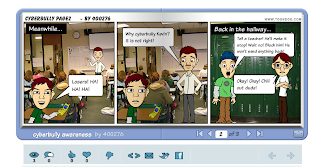
Here is another student example of a ToonDoo Comic
ToonDoo can be addictive.  I will warn you, students can spend a whole class period just trying to get their TraitR to look exactly like themselves. 

I love ToonDoo.  It is a free site for basic services, which is more than what we need in class.  You can also, of course, pay for an upgraded membership if your school can afford it.  When students are finished, they can share their Comics via email, Facebook, Twitter, or they can simply share the URL of the Comic.  This makes it very easy to share the comics with classmates, the school, the local community, and beyond. 

If you are interested in my StoryBoard Worksheets for this project, or my overall lesson plan, you can email me at mrddean@gmail.com.

Check out ToonDoo at :  http://www.toondoo.com/

Friday, November 11, 2011

Sense-Lang - Free & Customizable Touch Typing Lessons and Classroom Environment

Sense-Lang is a site I just started using this year.  Sense-Lang has great resources to allow students to learn Touch Typing Basics and strengthen both their speed and accuracy.  I used Typingweb.com last year, and liked the way it worked but I had to enter each of my students one by one (with the free version) cause it had no import feature.  Last year we were not on a block schedule so I was able to do that.  This year with a block schedule and 300 plus students, I really didn't have the time to enter everyone one by one.  Sense-Lang allows you to create classes, then students can login to your class with a class specific code, create their own account, and start typing right away.
Sense-Lang will let you create your own Custom Lessons

One of the features that is really nice in Sense-Lang is the option to customize your own lessons.  I created all 15 typing lessons for my students, each introducing 2 new letters or characters.  Typingweb.com would not let me do that.  I can also create custom typing games, lessons,  and tests using any words, letters, or phrases that I want.  I can even export my class progress and results to my email and open it in Excel.  Now you can easily create a graph in excel to show student progress.
Sense-Lang may have some ads on the home page, but once the students open the typing window for practice or quizzes, there are absolutely NO ADS!  I have found Sense-Lang to be one of the most full featured, FREE, online browser based typing websites you will find.  I am enjoying it and I love that my students can work on lessons in class with me, then practice at home in their spare time.

Check out Sense-Lang at:  http://www.sense-lang.org/

They even have a very easy to follow tutorial for the Sense-Lang Teaching Module to help you set up your class and get started.  Check it out:  http://www.sense-lang.org/teachers/instruction.pdf

Thursday, November 10, 2011

Reflections: Masters Course Technology Integration Class

This week I am completing my Technology Integration class as part of my Masters of Education Program.  During this class, I learned more about the importance of creating and participating in an effective PLN and resources to help strengthen my PLN.  I was also able to create an Internet Safety & Awareness WebQuest. It was excited to create another WebQuest for the first time in years.  I felt like I was learning it all over again "for the very first time."


I feel that my teaching strategies will change more in the area of applying myself as a leader of change in technology integration.  I will continue to strengthen my PLN and share it with my teaching colleagues.  I will continue to share my resources and strategies with my colleagues via this blog and social bookmarking sites.  I will be a leader of technology integration in my school by leading by example instead of forcing my strategies and resources on my colleagues.

Tuesday, November 8, 2011

A Thin Line - MTV's Site for Internet Safety & Digital Rights Online

A Thin Line is a very nice site created by MTV to promote digital rights and share Internet Safety Resources, tools, videos,  and strategies.  This site is more appropriate for 8th Grade through High School Students since some of the topics may be inappropriate for younger students. 

A Thin Line covers various Internet Safety Topics including:
  • Sexting
  • Constant Messaging
  • Spying
  • Digital Disrespect
  • Online Cruelty
You will find many different videos and even places for students to post and share their experiences with these topics online and even "SOUND OFF" or "DRAW THE LINE"  against those who are bothering them online. 
The site even includes an Interactive online map for students around the country to "DRAW A LINE" and share what they are doing to stamp out Sexting, Digital Disrespect in their home towns!

Check out A Thin Line at:  http://www.athinline.org/

Friday, October 28, 2011

Technology Integration - How we can serve as "teacher leaders" in our professional setting?

Any teacher who is effectively trying to integrate technology in their classroom knows how importance technology can be in the learning process of 21st Century Learners.  But what about some of our colleagues who have no interest in technology integration?  How can we serve as teacher leaders in technology integration in our schools?  There are two areas that I fell are paramount to serving as teacher leaders in integration.  These areas are sharing and leading by examples.  Nobody wants to be forced to do something they dont feel comfortable doing.  Technology integration can work as the same ways.  We need to invite our colleagues to join us or browse our Personal Learning Networks or PLNs.  We can show them what is working in our classroom through social bookmarking sites we invite them to join, through out blogs we ask them to browse, in our examples and lesson plans we share on our school websites.  When I find a resource that would be a great tool to integrate in the classroom, I try to email it to teaches I find would benefit from the resource. 

I also attempt to reach out and share the awesome projects we complete in class.  It is always nice to show off the finished projects your students are completing, but also the steps, strategies, and resources used to get there.  Allowing your students to share their impressions on a classroom forum is a great tool to show colleagues the level of engagement your students are experiencing in an effectively integrated lesson plan. 

I will never force technology integration on my fellow teachers, but I will always be open to share ideas and strategies with any teachers that want to use me as a resource.  This is the most productive first step I feel I can take to standing as a teacher leader in technology integration. 

Tuesday, October 25, 2011

Hector's World - Interactive Internet Safety Videos & Activities for Elementary Aged Students

Hector's World is a site out of New Zealand with 7 animated video episodes to teach students (Target Ages 2-9 Years Old) about Internet Safety.  It is obviously never too young to discuss basic concepts of Internet Safety and Digital Etiquette so Hector's World is a fantastic resource for Elementary Aged Students.  

Hector's World has 7 animated episodes students can watch, as well as, worksheets/guides students can fill in or read along the way.  The episodes star Hector, a talking dolphin, and his undersea friends as they share basic concepts and strategies for staying safe online.  These episodes are short but full of information and a great discussion starter or extension to your Internet Safety Discussions.   These animated episodes cover topics such as Protecting Personal Information, Cyberbullying, and Computer Security.

One of the areas I really like on Hector's World is the MP3 Download Section where you can download music and Lyrics to several Internet Safety Based songs and have students perform them in class or record them using a free resource such as Audacity. 

You can even download instrumentals and song lyrics.
The website has lesson plans for each animated episode broken down into different age groups so the information is age appropriate. 


The site can be difficult to navigate since you have to use bubble shaped arrows to move forward and backward within the site instead of browser window controls.  If you press back on your browser, it will start you all over at the beginning of the site.  So there is a learning curve to navigating the website, however, there is a website "tour" you can follow that shows you all of the features.  These tours are broken up for students, parents and teachers as seen in the image. 

Lesson Plans Are Broken Down by Grade Level!
Hector's World does have a site map to help you navigate between the different parts of the site.  This is helpful for both students and teachers, looking for a specific lesson or activity. 


Check out what all you can do with your students at Hector's World at:

http://www.hectorsworld.com/island/index.html

Friday, October 21, 2011

Internet Technologies & Concerns

As we strive to incorporate as many Internet Technologies and Resources into our daily curriculum to reach 21st Century learners, there are some concerns that can arise.
  • Are we choosing the best resources that help our students have authentic and effective learning experiences or are we simply trying to incorporate the latest technology trends just to say we did or because others are doing it to?  
  •  Are we relying too much on technology in our daily curriculum so when technology lets us down, we do not give ourselves an opportunity for a back up plan or on the fly replacement activity that is just as effective?  
We can alleviate these concerns by continuing to network with other instructors via blogs and other social networking sites to see what is working in their classrooms.  We can discuss if the latest and greatest resources are truly assisting in effective lesson planning or providing a distraction from the learning process for our students.   Sometimes I know that I get excited when some of my colleagues or online friends get excited about a new resource.  I feel like I just have to find a way to integrate that technology or resource into my curriculum.

As long as we all stay connected, share our experiences, and truly try to integrate technology to provide a better learning experience for our students, then when we fail, that doesn't mean we didn't necessarily succeed in some ways.  It is the experience and the journey to get there that will mostly make us all better teachers and provide teaching & learning experiences that stick with our students.

Friday, October 14, 2011

Symphony of Science - Scientific Knowledge and Philosophy through Music! This site is simply AWESOME!

Symphony of Science could be one of the coolest sites I have found in a while.  The site was created by John Boswell, who was heavily influenced by the Internet Legends The Greggory Brothers (Double Rainbow All The Way Across the Sky Music Video) and DJ Steve Porter (who created the awesome Rap Chop Music Video).   Symphony of Science features 11 full length music videos heavily influenced by the classic PBS Series Cosmos with Carl Sagan.  Many of the videos and the words to the songs are remixed episodes from Cosmos, Ted Talks and more.  To quote Mr. Boswell on the site: 

"The goal of the project is to bring scientific knowledge and philosophy to the public, in a novel way, through the medium of music. Science and music are two passions of mine that I aim to combine, in a way that is intended to bring a meaningful message to listeners, while simultaneously providing an enjoyable musical experience."

Did I mention this site is AWESOME?  The Music Videos are so well done and really engaging.  I shared them with an 8th Grade Science teacher of mine yesterday who was actually talking about Quantum Theory.  He immediately included the video from Symphony of Science called "Quantum World"  about Quantum Theory in his presentation for discussion today. 

Here is the Quantum Theory Video from Symphony of Science.
 

You can visit Symphony of Science at:  http://symphonyofscience.com

Thursday, October 13, 2011

Anatomy Arcade - Interactive Games and Resources About the Human Body!

Anatomy Arcade is a really neat site that has online games and interactive resources to help students learn about the anatomy of the human body.   The games themselves are divided up by body systems.  For example, you can click on games, then choose games about the skeletal system, articular system, muscle system, circulatory, respiratory, nervous, digestive, endocrine, and general. 


The games are pretty simply, including matching, jigsaws, word searches, crosswords, etc. Anatomy Arcade would be a great resource for Elementary Students just starting to learn about the Human Body Systems, or for students needing an extension to your current class curriculum. 

You can check out Anatomy Arcade at: http://www.anatomyarcade.com

 
Powered by Blogger