Tuesday, March 15, 2011

FotoFlexer - Free Full Featured Photo Editing in your Web Browser!

Fotoflexer bills itself as the most advanced online photo editor.  I would have a hard time disagreeing.  FotoFlexer is a fun, kid friendly online browser based photo editor with a user friendly interface.  The site costs nothing to use and you do not even have to sign up for an account.  I enjoy the site because it is very easy for my students to load up their images and apply dozens of effects, crop, resize, mirror, flip, rotate, etc. then save as a jpg file back to my computer.  It even has a very handy and convenient UNDO button so students can practice trial and error on their images till they get them exactly right.

Here are some examples of the tools you can use in FotoFlexer:


I know there are other sites that may offer similar features, however, FotoFlexer is another tool to add to your teacher technology toolbox.  My students love it and I am sure yours will too.  Below, I have posted several examples of some of the editing I did on my school picture.

Check out FotoFlexer:


Thursday, March 10, 2011

Purdue OWL - The most comprehensive MLA Formatting resource for Works Cited Information and Formats!

     If you have ever required your students to create a works cited page (and I am sure you have), then you have probably already found Purdue University's OWL MLA Formatting & Style Guide Website.  OWL stands for Online Writing Lab.  The site is one of the most comprehensive MLA Formatting & Style resources for works cited information. There are dozens of websites that automatically create works cited pages for you (some I will share later), but Purdue's OWL does a great job of actually explaining the MLA Format.

MLA, APA,  blah blah blah, no matter what format you require your Works Cited Pages in, citing your sources of information for a Research Paper, Essay, Class Project etc.. can be very confusing and frustrating for some students.  Purdue's OWL offers the resources to help understand the MLA Format.

Navigating the site can be a bit confusing, but to quote my collegue and 8th Grade Language Arts Teacher Mr. Harker, "Once you teach the students how to navigate the site, they have all the resources they need to cite any type of resource of information." 

Check out Purdue's OWL MLA Formatting and Style Guide at:
http://owl.english.purdue.edu/owl/resource/747/01/

Wednesday, March 9, 2011

Eskeletons - Interactive Environment to Explore & Skeletal Anatomy

This image compares the skulls of Gorillas & Humans
Eskeletons is an interactive site created by the University of Texas at Austin's Department of Anthropology.  The site allows you to explore and examine human and non-human primate skeletal anatomy.  This site is a great site if you are wanting to study the human skeletal system and/or compare the bones to different primates. 

Simply choose your Taxon (Human, Gorilla, Chimpanzee, Baboon, and many more) then choose the bone.  Finally, you can choose the view of the bone you want.  Then you will find high quality images of REAL BONES and not computer generated bones.  You can even select multiple Taxon at once so you can look at and compare their bone images all at once. 

This site is a wonderful tool when student human skeletal anatomy or that of different primates.

Check it out at http://www.eskeletons.org/index.html

Tuesday, March 8, 2011

Fodey - Newspaper Clipping Generator

A Ficticious Newspaper Article
Fodey offers a neat little webtool called the Newspaper Clipping Generator.  Students can create their own Newspaper Story that appears to be cut out, folded, then scanned.  We are currently using the Newspaper Clip Generator as part of our Iditarod Cross Curricular Project.  Students have to research a 2011 Iditarod News Story, then type a one paragraph summary of the article in the Newspaper Clip Generator.  The students then print them out and bind them in the Iditarod Book they each create.


An Example of our Iditarod New Summaries
This is a neat little tool that allows students to create their own realistic or fictitious newspaper clippings.  The site does allow you to create cigarette packets so you may want to make sure that students stick with the Newspaper Clipping Generator.  I have attached 2 images of clippings I have made.  The first one is about my blog and is totally fictitious.  The image to the right is an example of the Iditarod News Summaries we did in class. 


Check out the site here:
http://www.fodey.com/generators/newspaper/snippet.asp

Friday, March 4, 2011

Extreme Planet Makeover - Interactive Planet Creator!

Extreme Planet Makeover is an awesome interactive website provided by NASA.  The site allows you to create and edit your own custom planet.  This site is awesome because so many different aspects of how you create your planet will effect the makeup of the planet. 


  • Did you place your planet to close to a star?  The hot tempatures will burn up any liquids on your planet.  
  • Did you make your planet very large?  Expect it to have a very thick atmosphere like the larger planets in our Solar System. 
  • Did you make your planet to "old" or too "young"?  The exact age of your planet will determine the small window and opportunity for life to exist on your planet. 
 This site is a great extension to your Space & Solar System curriculum and a great way for students to investigate the relationships between planets, the stars, and more!


Check out Extreme Planet Makeover Today!

Thursday, March 3, 2011

GCF LearnFree - Great Interactive Internet Safety Resources, Lessons & More!

Internet Safety is one of my biggest passions within my classroom.  I spend more time with my students discussing different aspects of staying safe on the Internet than I probably have to.  However, I always feel like there is never TOO MUCH information when it comes to Internet Safety.

In my quest to find more engaging and interactive Internet Safety Resources, I stumbled across these interactive Internet Safety Resources via GCF LearnFree (GCF stands for Goodwill Community Foundation).  The site offers tons of free resources for your classroom, including lesson plans and interactives in Math & Reading.  They also have some very nice inter-activities for Internet Safety. 

Some of the Internet Safety Topics include:
  • Internet Safety Terms
  • Social Networking Terms
  • Choosing Antivirus Software
  • 6 tips for Identifying Phishing Scams (one of my favorites, see below)
  • Responding to Cyberstalking and Cyberbullying
  • And Much More! (There are 13 different Internet Safety related Interactive Activities)
One of my favorite interactives is the "Six Tips for Identifying Phishing Scams."  You get to look at an example of a Phishing Scam email with very clear bullet points for what to exactly look for in a Phishing Scam.  See the picture to the left. 

You can also check out their other resources on their home site at http://www.gcflearnfree.org/

Tuesday, March 1, 2011

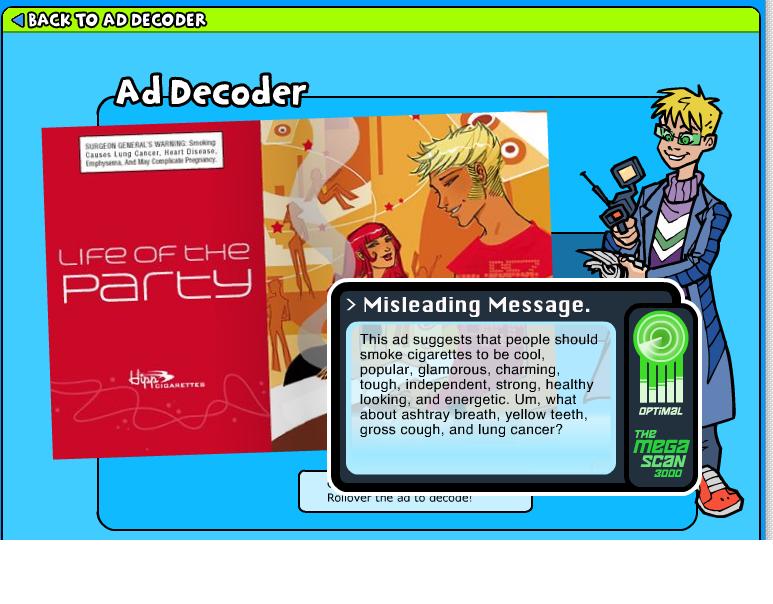
BAM! Body & Mind Ad Decoder - A Fun Game/Activity to help decode the true meaning of advertisements!

BAM!  Body and Mind Ad Decoder is a fun activity that allows students to flip through fictitious boy and girl magazines and analyze different health and body advertisements.   It is a part of the BAM! Body and Mind Site that is operated by the Center for Disease Control & Prevention.  This activity does a good job of showing the true purpose behind advertisements, to persuade the target audience and hopefully make money.  

This would be a great activity to allow your students to participate in while talking about writing persuasively, analyze advertisements in media, or even as an extension to a body and health awareness unit. This activity covers ads for Energy Drinks, Smoking, Body Weight, Nutrition and much more.  I just love this activity and this site.

This interactive activity is very slick and very well laid out.  You can also check out the full BAM! Body and Mind site for more awesome activities and resources for your classroom Health curriculum.  This is one of my students favorite sites when we talk about Healthy Minds & Bodies.  The full BAM!   The site is very kid friendly, easy to read, and written in a familiar language kids can relate to.  The full website can be found at:

http://www.bam.gov/index.html

 
Powered by Blogger