Tuesday, March 8, 2011

Fodey - Newspaper Clipping Generator

A Ficticious Newspaper Article
Fodey offers a neat little webtool called the Newspaper Clipping Generator.  Students can create their own Newspaper Story that appears to be cut out, folded, then scanned.  We are currently using the Newspaper Clip Generator as part of our Iditarod Cross Curricular Project.  Students have to research a 2011 Iditarod News Story, then type a one paragraph summary of the article in the Newspaper Clip Generator.  The students then print them out and bind them in the Iditarod Book they each create.


An Example of our Iditarod New Summaries
This is a neat little tool that allows students to create their own realistic or fictitious newspaper clippings.  The site does allow you to create cigarette packets so you may want to make sure that students stick with the Newspaper Clipping Generator.  I have attached 2 images of clippings I have made.  The first one is about my blog and is totally fictitious.  The image to the right is an example of the Iditarod News Summaries we did in class. 


Check out the site here:
http://www.fodey.com/generators/newspaper/snippet.asp

Friday, March 4, 2011

Extreme Planet Makeover - Interactive Planet Creator!

Extreme Planet Makeover is an awesome interactive website provided by NASA.  The site allows you to create and edit your own custom planet.  This site is awesome because so many different aspects of how you create your planet will effect the makeup of the planet. 


  • Did you place your planet to close to a star?  The hot tempatures will burn up any liquids on your planet.  
  • Did you make your planet very large?  Expect it to have a very thick atmosphere like the larger planets in our Solar System. 
  • Did you make your planet to "old" or too "young"?  The exact age of your planet will determine the small window and opportunity for life to exist on your planet. 
 This site is a great extension to your Space & Solar System curriculum and a great way for students to investigate the relationships between planets, the stars, and more!


Check out Extreme Planet Makeover Today!

Thursday, March 3, 2011

GCF LearnFree - Great Interactive Internet Safety Resources, Lessons & More!

Internet Safety is one of my biggest passions within my classroom.  I spend more time with my students discussing different aspects of staying safe on the Internet than I probably have to.  However, I always feel like there is never TOO MUCH information when it comes to Internet Safety.

In my quest to find more engaging and interactive Internet Safety Resources, I stumbled across these interactive Internet Safety Resources via GCF LearnFree (GCF stands for Goodwill Community Foundation).  The site offers tons of free resources for your classroom, including lesson plans and interactives in Math & Reading.  They also have some very nice inter-activities for Internet Safety. 

Some of the Internet Safety Topics include:
  • Internet Safety Terms
  • Social Networking Terms
  • Choosing Antivirus Software
  • 6 tips for Identifying Phishing Scams (one of my favorites, see below)
  • Responding to Cyberstalking and Cyberbullying
  • And Much More! (There are 13 different Internet Safety related Interactive Activities)
One of my favorite interactives is the "Six Tips for Identifying Phishing Scams."  You get to look at an example of a Phishing Scam email with very clear bullet points for what to exactly look for in a Phishing Scam.  See the picture to the left. 

You can also check out their other resources on their home site at http://www.gcflearnfree.org/

Tuesday, March 1, 2011

BAM! Body & Mind Ad Decoder - A Fun Game/Activity to help decode the true meaning of advertisements!

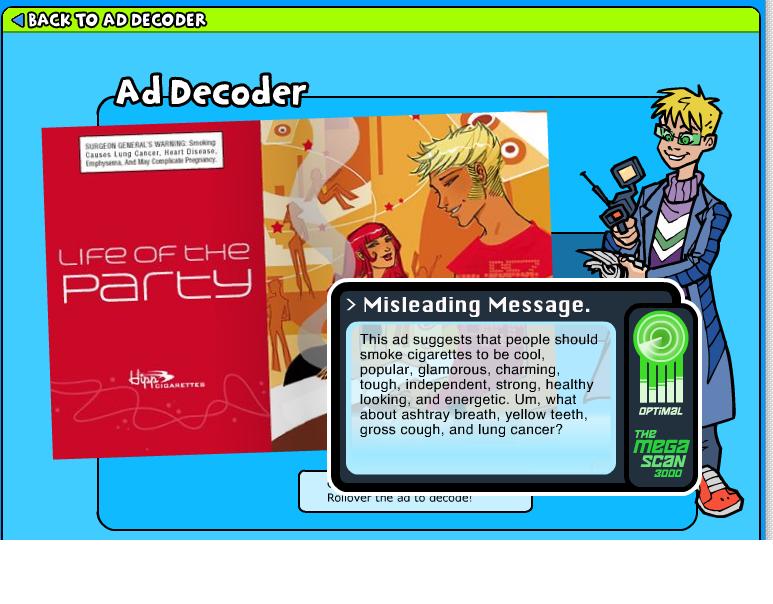
BAM!  Body and Mind Ad Decoder is a fun activity that allows students to flip through fictitious boy and girl magazines and analyze different health and body advertisements.   It is a part of the BAM! Body and Mind Site that is operated by the Center for Disease Control & Prevention.  This activity does a good job of showing the true purpose behind advertisements, to persuade the target audience and hopefully make money.  

This would be a great activity to allow your students to participate in while talking about writing persuasively, analyze advertisements in media, or even as an extension to a body and health awareness unit. This activity covers ads for Energy Drinks, Smoking, Body Weight, Nutrition and much more.  I just love this activity and this site.

This interactive activity is very slick and very well laid out.  You can also check out the full BAM! Body and Mind site for more awesome activities and resources for your classroom Health curriculum.  This is one of my students favorite sites when we talk about Healthy Minds & Bodies.  The full BAM!   The site is very kid friendly, easy to read, and written in a familiar language kids can relate to.  The full website can be found at:

http://www.bam.gov/index.html

Monday, February 28, 2011

SymbalooEDU - Customizable and Visual Personal Learning Environment. A great way to share your Web 2.0 Resources.

SymbalooEDU is the educational version of Symbaloo.  SymbalooEDU allows you to create a wall of "tiles" or visual bookmarks to share with your collegues or students.  It is free to sign up and share your wall with anyone.  You can even publish your wall where other teachers can copy it and edit it to create their own walls.

SymballooEDU does offer a premium version to allow your wall to have its own URL and log at the top of the page.  This allows you to share an entire webmix you create instead of only a specific page from your webmix.

You can even create different walls with your webmix to better organize your tiles/links.  So you could have a page for Math Resources, L.A. Resources, WEB 2.0 Resources, Health, etc.  You can see and example of my webmix and the different pages in the image to the right.

Check out SymbalooEDU today and start sharing your links and resources in a very visually appealing and customizable webmix.

http://edu.symbaloo.com/

Wednesday, February 23, 2011

Conceptu Math - Fraction Tools: Standards Aligned Interactives & Manipulatives to Help Understand Fractions

Conceptua Math Fraction Tools are great Interactives for helping your students understand Fractions.  The site has tools to help understand fractions on a number line, add & subtract fractions, identifying fractions, estimating, equivalents, finding common denominators & more.  Not only do they have interactive tools for visualizing each concept, they also have a video for how to use each tool, common core aligned standards for the tool, lesson plans and classroom activities (with a premium membership).

We use this site in Pride Class (Homeroom) as we practice our mathematics skills for our upcomming statewide standardized test.

The site and fraction tools are free to use, but you do have to sign up for a free account to use the tools.  You can sign up for a premium account if you would like detailed lesson plans as well as student individual logins.  

I would recommend this site as a tool to use with your students as a whole class instructive tool and not as a site you have them work on individually.  Again, you would have to pay for those features and I am trying to stress on this blog tools that will not cost you any money.  Go check out Conceptua Math and their Fraction Tools and see how you can use them in your classroom curriculum.

http://www.conceptuamath.com/fractions.html

Tuesday, February 22, 2011

Yebol - A visual, organized, cluster filled search engine, in a good way!

Yebol is an alternative search engine that organizes your search results into small clusters in an attempt to find the information you are looking for.  Yebol will display your search results in small clusters of video of your search query, photos of your search query, the top websites that contain your search query, tweets about your subject, related searches,  and much more.
An Example of results from a basic Yebol Search


Here is an example of a search I did just for the name of former Italian Fascist Dictator Benito Mussolini.  I didn't ask for anything specific, but you can see how my results are clustered by Images, Search Results, News, & Videos.  You have the Top Sites on the top left of the page, Related Searches just below that, and the tweets are below the Related Searches (not in the picture).

The search results also make it very clear where the information is coming from by listing the name of the website in bold print next to the Search Results under the Search Results Heading.

Yebol clearly lables the websites' name next to your results!
I am not exactly ready to use Yebol as my go to alternative to other search engines I use in class, however, the site does a good job of organizing your search results in an attempt to narrow your search results.  I would recommend Yebol to be used in your classroom for students who are overwhelmed with the information they get from a Google Search.  Yebol is also a great search engine for your visual learners since it does a nice job of dividing up your search results visually.  Finally, I have found Yebol to do a great job as a Multimedia search engine since it will clearly define images and videos within your search results.

Check out the Yebol Search Engine in your classroom and be sure to share any impressions!
http://yebol.com/

 
Powered by Blogger