Saturday, August 4, 2012

Forvo - Any Word, Pronounced

Forvo is a site that bills itself as "Any word in the world, Pronounced!"  When I first started navigating the site, I instantly realized what a fantastic tool it would be for your English Language ELL and English as a Second Language ESL Learners.  The site is simple, you enter any word in the search box and can hear it pronounced by simply clicking the play button. You are not limited to a single pronunciation cause there can be dozens for a specific word. 


What is even more interesting, users from around the world can record their pronunciations and upload them to Forvo.  This is awesome to hear a word such as "Castle" pronounced with different accents, from males and females.  Currently, you can hear people from the United States, Australia, United Kingdom, and Canada all pronounce the same word.  This gives you a chance to discuss different regions of the world and how their accents may sound when pronouncing English words.  It also serves as a great example of how their are multiple ways to pronounce a word correctly.  Just because YOUR pronunciation doesn't sound exactly like someone else's, doesn't make it incorrect.

You can check out Forvo at:
http://www.forvo.com/

Sunday, April 29, 2012

Arcademic Skill Builder - Competitive, trackable games to help build basic skills!

Arcademic Skill Builders offers a variety of games to help build and reinforce basic math, language arts, vocabulary and thinking skills.  The site allows teachers to upload a class of students and monitor their progress.  You can even group your students based on ability and assign different games and activities to different groups of your students.  Right now, the site is in beta and allows you to upload and monitor your class for free during the beta phase. 

Arcademic Skill Builders offers skill building games ranging from Grade1 through Grade 6 in topics covering:
  • Addition 
  • Subtraction
  • Division
  • Multiplication
  • Algebra
  • Fractions
  • Decimals
  • Integers
  •  Money
  • Time 
  • Geography
  • Typing
  • Language Arts
Games can even be played in competitive multi-player between students in your class.  Students can set up their own private games with other class members by sharing a password.  There is even an iPad app so students can play their games on the go.   Check out Academic Skill Builders today at:

http://www.arcademicskillbuilders.com


Thursday, March 15, 2012

You Are Here - Online Activities, Resources, & Games to teach kids to be smarter consumers!

You Are Here is a cool interactive site developed and hosted by the FTC (Federal Trade Commission) that offers many resources to help make kids smarter consumers.  You Are Here is broken up into 4 main sections of information:

The West Terrace - This is where students can learn about advertising techniques, suspicious claims, and more.

The Food Court - Students can learn about business competitions, monopolies, supply and demand, and more.

The Security Plaza - Students can learn about protecting their privacy and their online identity.

The East Terrace - Students can learn about online rip offs, bogus offers, and scams. 

There is even a Parents & Teachers Page with informational PDF Printouts and lots of lesson plans for each topic.


Check out You Are Here at:

http://www.ftc.gov/bcp/edu/microsites/youarehere/index.html

Thursday, February 16, 2012

"Its My Life" - Games, Activities, Advice, & Resources for Teens


Its My Life is a great resource provided by PBS that offers many resources, stategies, games, advice and forums for students to discuss issues relating to being a teenager.  Student can watch videos, share their experiences, take polls, play games and more across 6 different subjects related to today's teenagers.


It's My Life is broken up into resources and activities covering Friends, Family, School, Body, Emotions, and Money.  Just the games alone are a great resources for students who have a few extra time in class and you would like them to do something educational or worthwhile. 

 
It's My Life has contributions by a number of experts, doctors, teachers, conselors and more.  There is no subject off limits, but the subject matter is moderated to remain clean and safe for students and school.  


Check out It's My Life by PBS at:  
http://pbskids.org/itsmylife/index.html

Monday, January 9, 2012

We Give Books - Free Online Children Books & Helping Others All In One!

We Give Books is an awesome site that shares FREE Online Children Books.  This site was shared with me by one of our wonderful school counselors.


Every time you read a book, We Give Books a book to an organization or child that needs it.  The books are high quality online versions you can clip through page by page, complete with illustrations.

You can sign up for an account, or use your Facebook account to login, and keep track of the books you have read and the what has been donated on your behalf.  This is fun for your children and students to see how you progress and how much you give.

Check out We Give Books at:
http://www.wegivebooks.org/


Monday, January 2, 2012

Happy New Year 2012

Happy New Year 2012 to you all.  I have been on a holiday for the past several weeks and will be back sharing online Web 2.0 resources by the end of this week.  Thank you to all of you for your support and interest in my blog.  I really hope to get more feedback and comments on my blog posts in 2012 to truly make Class of Tech more interactive.  Thanks again and Happy New Year!

Friday, December 2, 2011

ToonDoo - Create custom comic books, online, with your own characters, images, and more!

ToonDoo is a site that allows students to create their own Comic Books, online, in their web browsers.  If you use technology in your class, you have probably heard of ToonDoo, but are you using it? 

Last school year, I blogged about using ComicMaster to create Internet Safety Comics.  You can read that post RIGHT HERE.  This year, we moved to ToonDoo to provide a more customizeable experience that really doesn't limit my students creativity. 

ToonDoo gives students a great resource to practice writing stories with a setting, characters, introduction, rising action, climax, resolution, and conclusion.  Students could start with a rough draft, or story board, then use their storyboard to create their final comic.

Mr. Dean "TraitR" in ToonDoo!
You can even use your own images to import into ToonDoo.  I took more than 30 images around my school of the cafeteria, gymnasium, hallways, classrooms, labs, etc.  Then, students could create their own "TraitR" or comic version of themselves to populate their images.  You can see the TraitR of myself in the image to the right.  

Since one of my passions is Internet Safety, I have my students creating Comic Books about 1 of 3 Internet Safety Topics; Online Identity Theft, Sexting, or Cyberbullying.  We start with a storyboard or rough draft.  When students have completed their storyboard, and I have checked it, they may begin working on their final comic.  A storyboard really helps give the students a direction so they do not waste time staring at ToonDoo and trying to come up with a story on the fly.  Each of my students' Comics must define the Internet Safety Topic, list 3 ways to prevent it, and list 3 ways to stop it if it has already happened. 

Here is an example of one of my student's finished comic books about Online Identity Theft:
http://www.toondoo.com/ViewBook.toon?bookid=331651

All of the characters were created by my 6th Grader, and the backgrounds on each frame are an assortment of images from our school, standard backgrounds from ToonDoo, and images from a Google Image search (since some scenes take place at home).  Students start by creating each frame of the comic, one by one.  They can then add these frames into the BookMaker and piece their frames together into their own Comic Book. 
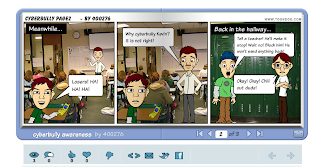
Here is another student example of a ToonDoo Comic
ToonDoo can be addictive.  I will warn you, students can spend a whole class period just trying to get their TraitR to look exactly like themselves. 

I love ToonDoo.  It is a free site for basic services, which is more than what we need in class.  You can also, of course, pay for an upgraded membership if your school can afford it.  When students are finished, they can share their Comics via email, Facebook, Twitter, or they can simply share the URL of the Comic.  This makes it very easy to share the comics with classmates, the school, the local community, and beyond. 

If you are interested in my StoryBoard Worksheets for this project, or my overall lesson plan, you can email me at mrddean@gmail.com.

Check out ToonDoo at :  http://www.toondoo.com/

 
Powered by Blogger