Thursday, March 15, 2012

You Are Here - Online Activities, Resources, & Games to teach kids to be smarter consumers!

You Are Here is a cool interactive site developed and hosted by the FTC (Federal Trade Commission) that offers many resources to help make kids smarter consumers.  You Are Here is broken up into 4 main sections of information:

The West Terrace - This is where students can learn about advertising techniques, suspicious claims, and more.

The Food Court - Students can learn about business competitions, monopolies, supply and demand, and more.

The Security Plaza - Students can learn about protecting their privacy and their online identity.

The East Terrace - Students can learn about online rip offs, bogus offers, and scams. 

There is even a Parents & Teachers Page with informational PDF Printouts and lots of lesson plans for each topic.


Check out You Are Here at:

http://www.ftc.gov/bcp/edu/microsites/youarehere/index.html

Thursday, February 16, 2012

"Its My Life" - Games, Activities, Advice, & Resources for Teens


Its My Life is a great resource provided by PBS that offers many resources, stategies, games, advice and forums for students to discuss issues relating to being a teenager.  Student can watch videos, share their experiences, take polls, play games and more across 6 different subjects related to today's teenagers.


It's My Life is broken up into resources and activities covering Friends, Family, School, Body, Emotions, and Money.  Just the games alone are a great resources for students who have a few extra time in class and you would like them to do something educational or worthwhile. 

 
It's My Life has contributions by a number of experts, doctors, teachers, conselors and more.  There is no subject off limits, but the subject matter is moderated to remain clean and safe for students and school.  


Check out It's My Life by PBS at:  
http://pbskids.org/itsmylife/index.html

Monday, January 9, 2012

We Give Books - Free Online Children Books & Helping Others All In One!

We Give Books is an awesome site that shares FREE Online Children Books.  This site was shared with me by one of our wonderful school counselors.


Every time you read a book, We Give Books a book to an organization or child that needs it.  The books are high quality online versions you can clip through page by page, complete with illustrations.

You can sign up for an account, or use your Facebook account to login, and keep track of the books you have read and the what has been donated on your behalf.  This is fun for your children and students to see how you progress and how much you give.

Check out We Give Books at:
http://www.wegivebooks.org/


Monday, January 2, 2012

Happy New Year 2012

Happy New Year 2012 to you all.  I have been on a holiday for the past several weeks and will be back sharing online Web 2.0 resources by the end of this week.  Thank you to all of you for your support and interest in my blog.  I really hope to get more feedback and comments on my blog posts in 2012 to truly make Class of Tech more interactive.  Thanks again and Happy New Year!

Friday, December 2, 2011

ToonDoo - Create custom comic books, online, with your own characters, images, and more!

ToonDoo is a site that allows students to create their own Comic Books, online, in their web browsers.  If you use technology in your class, you have probably heard of ToonDoo, but are you using it? 

Last school year, I blogged about using ComicMaster to create Internet Safety Comics.  You can read that post RIGHT HERE.  This year, we moved to ToonDoo to provide a more customizeable experience that really doesn't limit my students creativity. 

ToonDoo gives students a great resource to practice writing stories with a setting, characters, introduction, rising action, climax, resolution, and conclusion.  Students could start with a rough draft, or story board, then use their storyboard to create their final comic.

Mr. Dean "TraitR" in ToonDoo!
You can even use your own images to import into ToonDoo.  I took more than 30 images around my school of the cafeteria, gymnasium, hallways, classrooms, labs, etc.  Then, students could create their own "TraitR" or comic version of themselves to populate their images.  You can see the TraitR of myself in the image to the right.  

Since one of my passions is Internet Safety, I have my students creating Comic Books about 1 of 3 Internet Safety Topics; Online Identity Theft, Sexting, or Cyberbullying.  We start with a storyboard or rough draft.  When students have completed their storyboard, and I have checked it, they may begin working on their final comic.  A storyboard really helps give the students a direction so they do not waste time staring at ToonDoo and trying to come up with a story on the fly.  Each of my students' Comics must define the Internet Safety Topic, list 3 ways to prevent it, and list 3 ways to stop it if it has already happened. 

Here is an example of one of my student's finished comic books about Online Identity Theft:
http://www.toondoo.com/ViewBook.toon?bookid=331651

All of the characters were created by my 6th Grader, and the backgrounds on each frame are an assortment of images from our school, standard backgrounds from ToonDoo, and images from a Google Image search (since some scenes take place at home).  Students start by creating each frame of the comic, one by one.  They can then add these frames into the BookMaker and piece their frames together into their own Comic Book. 
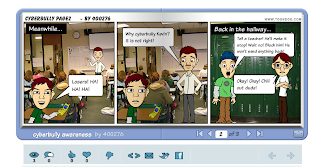
Here is another student example of a ToonDoo Comic
ToonDoo can be addictive.  I will warn you, students can spend a whole class period just trying to get their TraitR to look exactly like themselves. 

I love ToonDoo.  It is a free site for basic services, which is more than what we need in class.  You can also, of course, pay for an upgraded membership if your school can afford it.  When students are finished, they can share their Comics via email, Facebook, Twitter, or they can simply share the URL of the Comic.  This makes it very easy to share the comics with classmates, the school, the local community, and beyond. 

If you are interested in my StoryBoard Worksheets for this project, or my overall lesson plan, you can email me at mrddean@gmail.com.

Check out ToonDoo at :  http://www.toondoo.com/

Friday, November 11, 2011

Sense-Lang - Free & Customizable Touch Typing Lessons and Classroom Environment

Sense-Lang is a site I just started using this year.  Sense-Lang has great resources to allow students to learn Touch Typing Basics and strengthen both their speed and accuracy.  I used Typingweb.com last year, and liked the way it worked but I had to enter each of my students one by one (with the free version) cause it had no import feature.  Last year we were not on a block schedule so I was able to do that.  This year with a block schedule and 300 plus students, I really didn't have the time to enter everyone one by one.  Sense-Lang allows you to create classes, then students can login to your class with a class specific code, create their own account, and start typing right away.
Sense-Lang will let you create your own Custom Lessons

One of the features that is really nice in Sense-Lang is the option to customize your own lessons.  I created all 15 typing lessons for my students, each introducing 2 new letters or characters.  Typingweb.com would not let me do that.  I can also create custom typing games, lessons,  and tests using any words, letters, or phrases that I want.  I can even export my class progress and results to my email and open it in Excel.  Now you can easily create a graph in excel to show student progress.
Sense-Lang may have some ads on the home page, but once the students open the typing window for practice or quizzes, there are absolutely NO ADS!  I have found Sense-Lang to be one of the most full featured, FREE, online browser based typing websites you will find.  I am enjoying it and I love that my students can work on lessons in class with me, then practice at home in their spare time.

Check out Sense-Lang at:  http://www.sense-lang.org/

They even have a very easy to follow tutorial for the Sense-Lang Teaching Module to help you set up your class and get started.  Check it out:  http://www.sense-lang.org/teachers/instruction.pdf

Thursday, November 10, 2011

Reflections: Masters Course Technology Integration Class

This week I am completing my Technology Integration class as part of my Masters of Education Program.  During this class, I learned more about the importance of creating and participating in an effective PLN and resources to help strengthen my PLN.  I was also able to create an Internet Safety & Awareness WebQuest. It was excited to create another WebQuest for the first time in years.  I felt like I was learning it all over again "for the very first time."


I feel that my teaching strategies will change more in the area of applying myself as a leader of change in technology integration.  I will continue to strengthen my PLN and share it with my teaching colleagues.  I will continue to share my resources and strategies with my colleagues via this blog and social bookmarking sites.  I will be a leader of technology integration in my school by leading by example instead of forcing my strategies and resources on my colleagues.

 
Powered by Blogger